This project is password protected
End-to-end project, from ideation to research, design to launch
Matcha Time (Match your Time)
Matcha Time is a simple-to-use desktop app that makes time zone coordination effortless. It helps you quickly answer the question, “What time is it there when it’s this time here?”—so global collaboration feels simple, not confusing.
Duration
1 Month
Team
1 Product Designer (Me)
1 Developer
Scope of work
Product Design
UX Design
Project Management
Output
MacOS App

The Problem
Lack of efficiency and convenience in aligning timezones between remote workers
As a remote individual contributor for the past five years, I’ve consistently heard a shared frustration among global teams: the challenge of finding overlapping working hours across time zones. Whether it's scheduling meetings, setting expectations, or simply collaborating in real time, “matching time” often became a hidden barrier to effective teamwork.
How might we…
make time zone coordination feel effortless for remote workers juggling global schedules?
The Solution
A quiet helper for noisy timezone chaos
I designed a lightweight macOS desktop app that helps remote team members easily coordinate across time zones—without interrupting their workflow. Since users are typically at their computers while working, a desktop solution felt like the most natural and accessible format.
This work centered around three key objectives…
Reduce time-checking friction
Make future time planning easy
End Goal
Empower remote workers to spend less time scheduling and more time collaborating—so timezone logistics never get in the way of good teamwork.
The Process
Test 1
Test description goes here
Test 1
Test description goes here
Test 1
Test description goes here
Test 1
Test description goes here
Test 1
Test description goes here
Empathize
What We Heard, and What It Meant
I always struggle setting meetings because my teammates work from everywhere
Daylight savings got me confused and I ran into my meeting late
I don't know how many times I've asked, "What time is it over there again?
Time zones interrupt workflow
To check time zones, people often have to stop working, search on Google, and make sure daylight savings is correct. It’s not just setting a meeting—it’s all the extra steps that slow things down.
It’s not just “what time is it now?”
Users don’t just need to know the current time elsewhere—they need to know what time it will be for others at a future point. This makes scheduling even harder without the right tools.
Research
What's already out there - and what's missing
Many tools already let users view multiple time zones at once. Most also include extra features—like meeting planners, team availability views, or calendar syncing—that make each product feel unique. But for users who just want a quick way to check and plan across time zones, these tools can feel too complex.

Even outside of direct competitors, there are similar, helpful features…
Tools like Google Calendar offer helpful timezone features.
For example, users can:
(See right)
Add a secondary timezone to show two time zones side-by-side in day/week views
(See below)
Use the world clock sidebar, which displays selected city names with their current times and updates automatically when scheduling meetings


So, what did I discover?
💡 This confirmed my belief that there’s space for a lightweight, standalone tool, something built just for quick time checks and cross-timezone coordination.
—————————————————————
Define
Two Roles, One Shared Frustration
To build a tool that truly supports global collaboration, it was important to consider the experience from both sides: those scheduling meetings and those receiving them. Two key personas were created to reflect these roles—a project manager responsible for coordinating across time zones, and a teammate navigating meetings from different parts of the world. These perspectives helped shape the product direction by grounding decisions in real-world behaviors and needs.
👩💼
The Coordinator
Name: Maya (She/Her)
Role: Freelance Project Manager
Location: Los Angeles
Works with: Clients & collaborators in London, Dubai, Sydney
Goals:
– Schedule meetings that are considerate of everyone’s time
– Avoid rescheduling or confusion
– Keep project timelines on track
Frustrations:
– Unsure if she’s picking a time that works for everyone
– Daylight saving changes make scheduling tricky
– Constantly switching tools to check time zones
Needs:
– A quick way to compare multiple time zones
– Confidence when choosing cross-regional meeting times
– A smoother planning process without breaking her workflow
🧑💻
The Collaborator
Name: Taku (He/Him)
Role: Backend Engineer at a remote-first startup
Location: Tokyo
Works with: Design & product teams in Europe/North America
Goals:
– Understand what time meetings will happen in his local time
– Avoid early morning or late-night meetings when possible
– Stay focused on work without time-related distractions
Frustrations:
– Gets meeting invites at inconvenient hours
– Confused by time differences and daylight savings
– Has to stop working to double-check meeting times
Needs:
– A clear way to see what time a meeting will be for him
– Less time spent converting or confirming time zones
– Simple tools that help him stay aligned without effort
Starting simple
01.
Add a City
Users can add a city to see its current local time alongside their own. This makes it easy to get a quick sense of what time it is on the other side of the world.
02.
Jump to a Local Time
Users can jump to a specific time in their own timezone to instantly see the corresponding time in all added cities. It’s a quick way to check overlap and plan ahead.
03.
Reverse the View
Users can also jump to a specific time in another city to find out what time that would be locally. This makes it easy to answer, "If it’s 3PM in London, what time is that for me?"
Ideate & Iterate
Designing Beyond the Happy Path
Early Testing, Quick Insights
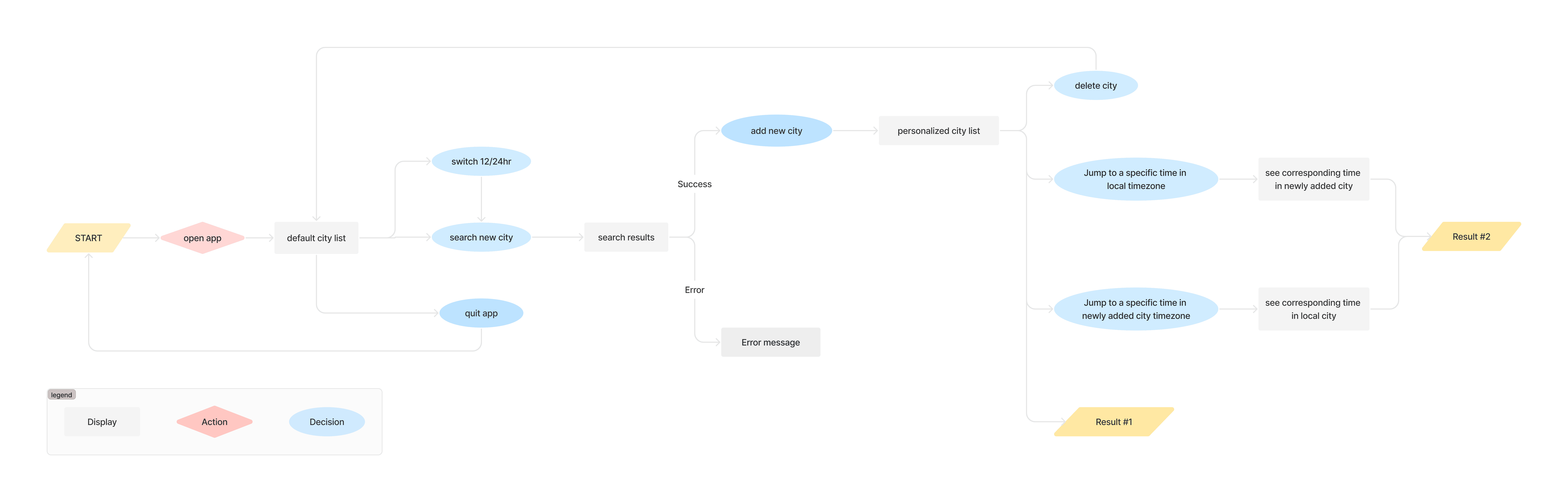
I started with low- to mid-fidelity wireframes and ran three quick unmoderated usability tests, focusing on two things: basic usability and navigation.
What I Missed
The main flow—adding a city—worked well. But users quickly revealed gaps I hadn’t considered. Simple questions came up:
– “How do I delete a city?”
– “What happens if I mistype a city name?”
– “How do I close the app completely?”
Why It Mattered
These weren’t edge cases—they were real needs. Without clear answers, users could easily get confused or stuck. Catching this early helped me expand the design to support not just the happy path, but the full user experience.

Feedback, Communicate, Iterate (Repeat)
Design iteration wasn’t done in isolation—it was a collaborative loop between designer and developer. We shared feedback frequently, made quick adjustments, and kept everything aligned through Figma and Notion. This steady back-and-forth helped us catch gaps early and refine the experience with both design intent and technical feasibility in mind.


Ship
A Quiet Launch, A Big Moment
After rounds of iteration, testing, and tweaks, we were finally ready to release the first version of Matcha Time—a lightweight macOS desktop app built to make timezone coordination just a little bit easier. We prepped everything for Apple’s submission form, double-checked every field, and hit send. I wasn’t expecting much—it was my first time submitting an app, and I braced myself for delays. But just a few hours later, the email came in: approved. Matcha Time was live.

The Problem, Solved
Before Matcha Time, checking time zones meant breaking focus—Googling cities, double-checking daylight savings, and doing mental math just to schedule a meeting. Even trickier was figuring out future times: “If it’s 3PM here, what time will it be there?” Matcha Time removes that friction. With just a glance, I can see current and future times across cities, compare them side by side, and plan confidently—no extra steps, no second-guessing. It’s become second nature in my day-to-day.

Output
MacOS desktop app
A simple, focused macOS desktop app built for quick, cross-timezone coordination. It's available on MacOS: https://apps.apple.com/us/app/matcha-time/id6497067918?mt=12
Outcome
# of downloads
Without any marketing, Matcha Time reached 30 downloads—purely through word of mouth and curiosity.
Key Takeaways
Hats Worn, Lessons Learned
Wearing multiple hats throughout this project was both challenging and incredibly rewarding. Being involved from start to finish gave me a full view of the product lifecycle and a deeper appreciation for how each decision shapes the user experience.
An iterative design approach helped the product evolve in real-time—testing, learning, and improving at every step. Each round brought us closer to something that felt truly useful and intuitive.
What's next
Coming soon!
Phase 2 is already in motion. We'll be gathering more user feedback, running usability tests, and iterating further. New ideas on the table include subtle animations, dark mode, and the ability to reorder city cards in the main view.